
Designing Workarounds
Product
Archipelago's property risk insurance platform is used by enterprise clients like Amazon and Meta. The platform is highly data-intensive, designed to help users manage vast portfolios of insurance documents and property details.
Problems
A product this data-heavy lives or dies by its navigation. Some clients managed upwards of 500,000 files and countless data points. However, we faced two critical issues with our search functionality.
Search was case-sensitive and required character-for-character accuracy. On top of that, almost all files were named with strings of random characters and integers (e.g., "TR_9021_XJ.pdf"), making them impossible to find via keyword search.
When engineering confirmed they didn't have the bandwidth for a total search overhaul, I had to design a UX workaround that would allow users to find what they needed without relying on file names.
Methods
To find a solution, I looked beyond the file names to see how people actually communicated. I spoke with account managers to learn the shorthands they used when discussing files with one another. I also reviewed hours of client session recordings provided by our marketing team to identify navigation patterns and where users were getting stuck.
Results
By shifting the focus from search to filtering, we saw a dramatic improvement in efficiency. Based on self-reported data from account managers, a specific file or data point took 5-20 minutes to find. After we implemented my solutions, the same tasks took 1-5 minutes.
Solutions
Because the search bar often led to a frustrating "No Results" screen, I visually minimized search and moved it to the top-right corner. This subtly nudged users toward more reliable navigation methods.
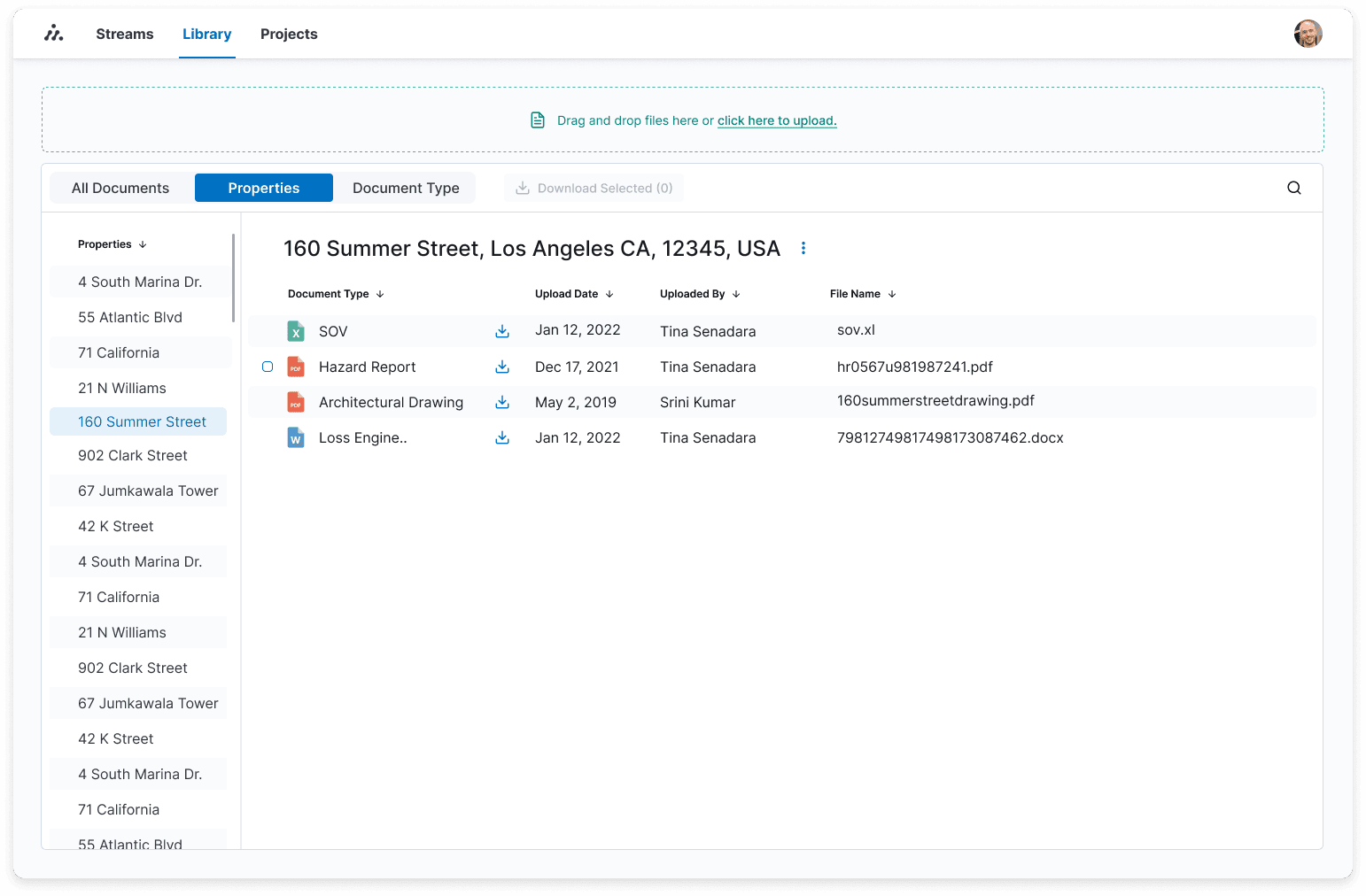
My research revealed three key values account managers used to identify files: Who uploaded it, when it was uploaded, and the file type. I implemented a system that allowed users to filter by these attributes. Now, if a user needs an "SOV" (Statement of Values) uploaded by "Tina," they can find it in seconds without ever knowing the actual file name.
Users naturally group properties by region (e.g., "Coastal Properties" or "River-walk Properties"). While we couldn't yet build a system that dynamically matched those subjective mental models, we bridged the gap by organizing data through street addresses and consistent property tags. This provided a grounded, predictable structure that replaced the chaos of random file names.
Additional UI improvements like color-coded icons and proper labels tied the experience together. It is rare for a massive enterprise platform to function effectively without a working search bar, but by understanding the user’s mental model, we made it work.